<?xml version="1.0" encoding="utf-8"?>
<feed xmlns="http://www.w3.org/2005/Atom">
  <title>Icicles of Thought</title>
  
  <subtitle>Notes on Software Craftsmanship, Web Development &amp; Distributed Systems</subtitle>
  <link href="https://lorefnon.me/atom.xml" rel="self"/>
  
  <link href="https://lorefnon.me/"/>
  <updated>2024-02-07T18:40:09.464Z</updated>
  <id>https://lorefnon.me/</id>
  
  <author>
    <name>Lorefnon</name>
    
  </author>
  
  <generator uri="https://hexo.io/">Hexo</generator>
  
  <entry>
    <title>Omitting keys in mapped types</title>
    <link href="https://lorefnon.me/2024/02/06/Omitting-keys-in-mapped-types/"/>
    <id>https://lorefnon.me/2024/02/06/Omitting-keys-in-mapped-types/</id>
    <published>2024-02-06T18:30:00.000Z</published>
    <updated>2024-02-07T18:40:09.464Z</updated>
    
    <content type="html"><![CDATA[<p>Let&#39;s use the following type: </p><pre><code class="hljs ts"><span class="hljs-keyword">interface</span> <span class="hljs-title class_">User</span> &#123;    <span class="hljs-attr">name</span>: <span class="hljs-built_in">string</span>    <span class="hljs-attr">age</span>: <span class="hljs-built_in">number</span>    <span class="hljs-attr">address</span>: &#123;        <span class="hljs-attr">city</span>: <span class="hljs-built_in">string</span>        <span class="hljs-attr">country</span>: <span class="hljs-built_in">string</span>    &#125;&#125;</code></pre><p>TS enables us to map over the keys of an object type to derive new types. Simplest example would be something like this:</p><pre><code class="hljs ts"><span class="hljs-keyword">type</span> <span class="hljs-title class_">User</span>$1 = &#123;    [K <span class="hljs-keyword">in</span> keyof <span class="hljs-title class_">User</span>]: <span class="hljs-title class_">User</span>[K]&#125;</code></pre><p>Because we are mapping keys in <code>User</code> type to corresponding values in <code>User</code> type, our <code>User$1</code> is equivalent to <code>User</code>.</p><p>Most mapped types we see in the wild will use a different value type, typically one that is derived from <code>User[K]</code>.</p><p>The issue we want to tackle is that we want to omit certain keys when generating the mapped type. </p><p>Here, let&#39;s say we want to include only those keys whose value types are primitive.</p><pre><code class="hljs ts"><span class="hljs-keyword">type</span> <span class="hljs-title class_">Primitive</span> = <span class="hljs-built_in">string</span> | <span class="hljs-built_in">number</span> | <span class="hljs-built_in">boolean</span> | <span class="hljs-built_in">symbol</span>;</code></pre><p>If the user type is known to us in advance, we can simply do: </p><pre><code class="hljs ts"><span class="hljs-keyword">type</span> <span class="hljs-title class_">User</span>$2 = &#123;    [K <span class="hljs-keyword">in</span> keyof <span class="hljs-title class_">Pick</span>&lt;<span class="hljs-title class_">User</span>, <span class="hljs-string">&quot;name&quot;</span> | <span class="hljs-string">&quot;age&quot;</span>&gt;]: <span class="hljs-title class_">User</span>[K]&#125;<span class="hljs-comment">// &#123; name: string, age: number &#125;</span></code></pre><p>However, often we won&#39;t have the User type known to us ahead of time, or we wouldn&#39;t want to hard code the keys.</p><p>We could map the values we don&#39;t want to never:</p><pre><code class="hljs ts"><span class="hljs-keyword">type</span> <span class="hljs-title class_">User</span>$3 = &#123;    [K <span class="hljs-keyword">in</span> keyof <span class="hljs-title class_">User</span>]: <span class="hljs-title class_">User</span>[K] <span class="hljs-keyword">extends</span> <span class="hljs-title class_">Primitive</span>        ? <span class="hljs-title class_">User</span>[K]        : <span class="hljs-built_in">never</span>&#125;<span class="hljs-comment">// &#123; name: string, age: number, address: never &#125;</span></code></pre><p>This is close. But, that never type can cause issues in some scenarios. By mapping the value type to never, we are saying that forany type to be compatible with <code>User$3</code>, address must not be present. Depending on the use case, this can be undesirable.</p><p>What if we want to just remove the keys which we don&#39;t want ?</p><p>To achieve that, instead of mapping the value type, we can map the key type to never for cases we want to omit: </p><pre><code class="hljs ts"><span class="hljs-keyword">type</span> <span class="hljs-title class_">User</span>$4 = &#123;    [K <span class="hljs-keyword">in</span> keyof <span class="hljs-title class_">User</span> <span class="hljs-keyword">as</span> (        <span class="hljs-title class_">User</span>[K] <span class="hljs-keyword">extends</span> <span class="hljs-title class_">Primitive</span>             ? K             : <span class="hljs-built_in">never</span>    )]: <span class="hljs-title class_">User</span>[K]&#125;<span class="hljs-comment">// &#123; name: string, age: number &#125;</span></code></pre><p>This is a bit less readable, but exactly what we wanted.</p>]]></content>


    <summary type="html">&lt;p&gt;Let&amp;#39;s use the following type: &lt;/p&gt;
&lt;pre&gt;&lt;code class=&quot;hljs ts&quot;&gt;&lt;span class=&quot;hljs-keyword&quot;&gt;interface&lt;/span&gt; &lt;span class=&quot;hljs-title cla</summary>


  </entry>
  
  <entry>
    <title>Decomposing your taskfiles</title>
    <link href="https://lorefnon.me/2024/01/30/decomposing-your-taskfiles"/>
    <id>https://lorefnon.me/2024/01/30/decomposing-your-taskfiles</id>
    <published>2024-01-29T18:30:00.000Z</published>
    <updated>2024-02-07T18:40:09.464Z</updated>
    
    <content type="html"><![CDATA[<p><a href="https://taskfile.dev/" target="_blank" rel="noopener external nofollow noreferrer">Taskfile.dev</a> is a very convenient language&#x2F;framework agnostic task runner that I frequently use in larger projects - esp. ones that are composed of polyglot services. It is also a nice alternative to npm scripts which start to get unweidly once you begin to have dependencies that you want to run in parallel, want to run certain scripts in certain folder etc.</p><p>However, sooner or later, the primary taskfile grows quite large as we add more and more tasks.</p><p>Fortunately taskfile has a nice solution for this, we can include other taskfiles in a taskfile.</p><pre><code class="hljs plaintext">version: &quot;3&quot;includes:  backend:    taskfile: ./modules/backend/Taskfile.part.yaml    dir: ./modules/backend  frontend:    taskfile: ./modules/frontend/Taskfile.part.yaml    dir: ./modules/frontend</code></pre><p>This is particularly convenient for monorepos where each module will typically have a set of closely related set of tasks that depend on each other, but are otherwise unrelated to tasks for other modules&#x2F;services. Its also nice that all the tasks get auto-prefixed so a <code>build</code> task defined in <code>backend/Taskfile.part.yaml</code> will be available as <code>backend:build</code>.</p><p>Note that we named our constituent taskfiles as <code>Taskfile.part.yaml</code> rather than <code>Taskfile.yaml</code>.</p><p>If we use  the latter, any tasks defined in the top level <code>Taskfile.yaml</code> will become inaccessible while we are in child directories because task will just find the first <code>Taskfile.yaml</code> in parent directory and stop there. So any tasks in parent taskfile will not be found. It also causes confusion because in subdirectories we will need to use unprefixed tasks where as in top level we will need to run prefixed tasks.</p><p>If you use yaml-language-server, you can get autocompletion and checking for your Taskfile.part.yaml files by adding this comment to top: </p><pre><code class="hljs plaintext"># yaml-language-server: $schema=https://taskfile.dev/schema.json</code></pre>]]></content>


    <summary type="html">&lt;p&gt;&lt;a href=&quot;https://taskfile.dev/&quot; target=&quot;_blank&quot; rel=&quot;noopener external nofollow noreferrer&quot;&gt;Taskfile.dev&lt;/a&gt; is a very convenient languag</summary>


    <category term="taskfile" scheme="https://lorefnon.me/tags/taskfile/"/>
    
  </entry>
  
  <entry>
    <title>Using react-native (metro) in a pnpm workspace</title>
    <link href="https://lorefnon.me/2024/01/29/using-react-native-metro-in-pnpm-workspace"/>
    <id>https://lorefnon.me/2024/01/29/using-react-native-metro-in-pnpm-workspace</id>
    <published>2024-01-28T18:30:00.000Z</published>
    <updated>2024-02-07T18:40:09.464Z</updated>
    
    <content type="html"><![CDATA[<p>For quite a while, <a href="https://metrobundler.dev/" target="_blank" rel="noopener external nofollow noreferrer">metro</a> and <a href="https://pnpm.io/" target="_blank" rel="noopener external nofollow noreferrer">pnpm</a> didn&#39;t play well with each other. Usually workarounds involved <a href="https://pnpm.io/npmrc#shamefully-hoist" target="_blank" rel="noopener external nofollow noreferrer">&quot;shamefully-hoisting&quot;</a> which negated many benefits of pnpm.</p><p>However, recently metro has added support for symlinks (though marked unstable as of this writing) which makes it possible for us to use a react-native + metro project with pnpm. </p><p>There are a few considerations though:</p><ol><li><p>You may need to install some additional dev dependencies which didn&#39;t before. </p><p> There are some dependencies which the RN project generated by the scaffolder uses, but doesn&#39;t depend on directly. They are just assumed to be available due to hoisting behavior of npm. </p><p> pnpm adopts a more principled stance towards dependency hosting, which IMHO is better. So, you will need directly depend on these packages.</p> <pre><code class="hljs sh">pnpm i -D @react-native/gradle-plugin @react-native-community/cli-platform-android @react-native-community/cli</code></pre><p> Be mindful of versions if you are updating an older project that is not yet updated to use latest RN.</p></li><li><p>Metro still needs to be aware of all source roots. This is an issue if we are also using pnpm workspaces.</p><p> While the bundler can follow symlinks, we still need to explicitly register all the root directories which may contain bundled files (including the symlink targets) through the rather weirdly named <code>watchFolders</code>.</p><p> From the <a href="https://metrobundler.dev/docs/configuration/" target="_blank" rel="noopener external nofollow noreferrer">official docs</a></p><blockquote><p>Despite the naming of this option, it isn&#39;t related solely to file watching. Even in an offline build (for example, in CI), all files must be visible to Metro through the combination of watchFoldersand projectRoot.</p></blockquote><p> So let&#39;s say your RN project depends on another module in the pnpm workspace called <code>shared</code>, we need the following in <code>metro.config.js</code>:</p> <pre><code class="hljs js"><span class="hljs-variable language_">module</span>.<span class="hljs-property">exports</span> = <span class="hljs-title function_">mergeConfig</span>(defaultConfig, &#123;    <span class="hljs-comment">// ... other config</span>    <span class="hljs-attr">watchFolders</span>: [        __dirname,        path.<span class="hljs-title function_">resolve</span>(__dirname, <span class="hljs-string">&quot;../../node_modules&quot;</span>), <span class="hljs-comment">// Should resolve to top level node_modules</span>        path.<span class="hljs-title function_">resolve</span>(__dirname, <span class="hljs-string">&quot;../shared&quot;</span>), <span class="hljs-comment">// Any other modules the RN project depends on</span>    ],&#125;</code></pre><p> As shown above, we also need to add the top level <code>node_modules</code> folder where pnpm will install the dependencies.</p></li></ol><p>And that is pretty much all that is needed.</p>]]></content>


    <summary type="html">&lt;p&gt;For quite a while, &lt;a href=&quot;https://metrobundler.dev/&quot; target=&quot;_blank&quot; rel=&quot;noopener external nofollow noreferrer&quot;&gt;metro&lt;/a&gt; and &lt;a href=</summary>


    <category term="react-native" scheme="https://lorefnon.me/tags/react-native/"/>
    
    <category term="metro-bundler" scheme="https://lorefnon.me/tags/metro-bundler/"/>
    
  </entry>
  
  <entry>
    <title>Effectively working with csv files in neovim</title>
    <link href="https://lorefnon.me/2024/01/17/Effectively-working-with-csv-files-in-vim/"/>
    <id>https://lorefnon.me/2024/01/17/Effectively-working-with-csv-files-in-vim/</id>
    <published>2024-01-17T07:41:37.000Z</published>
    <updated>2024-02-07T18:40:09.464Z</updated>
    
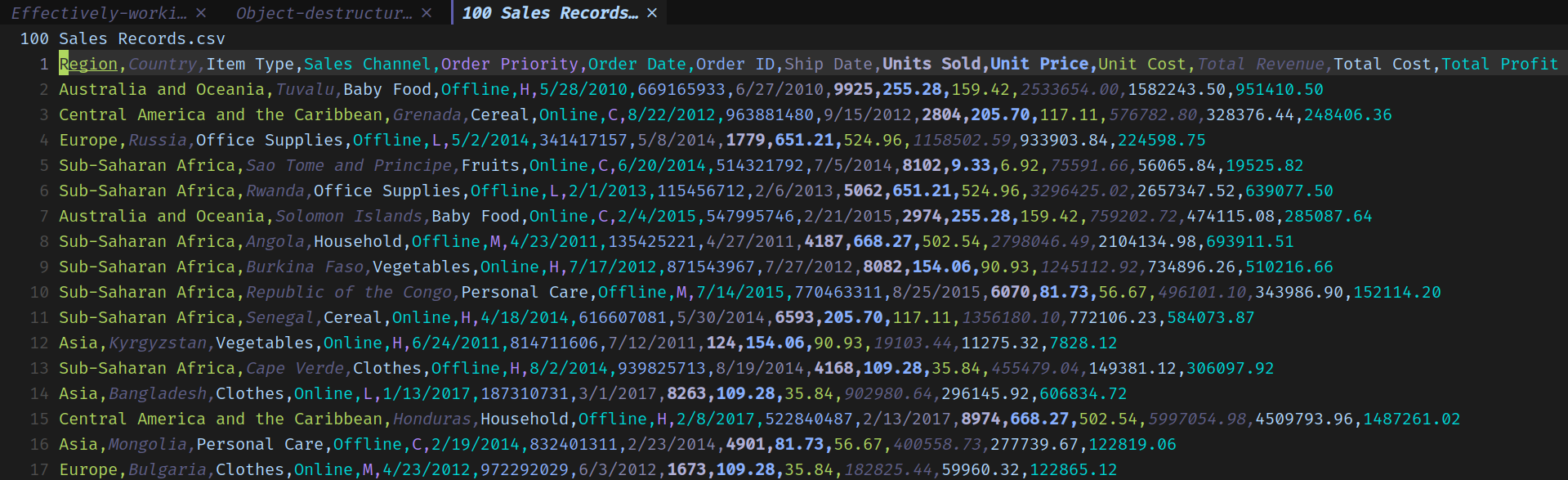
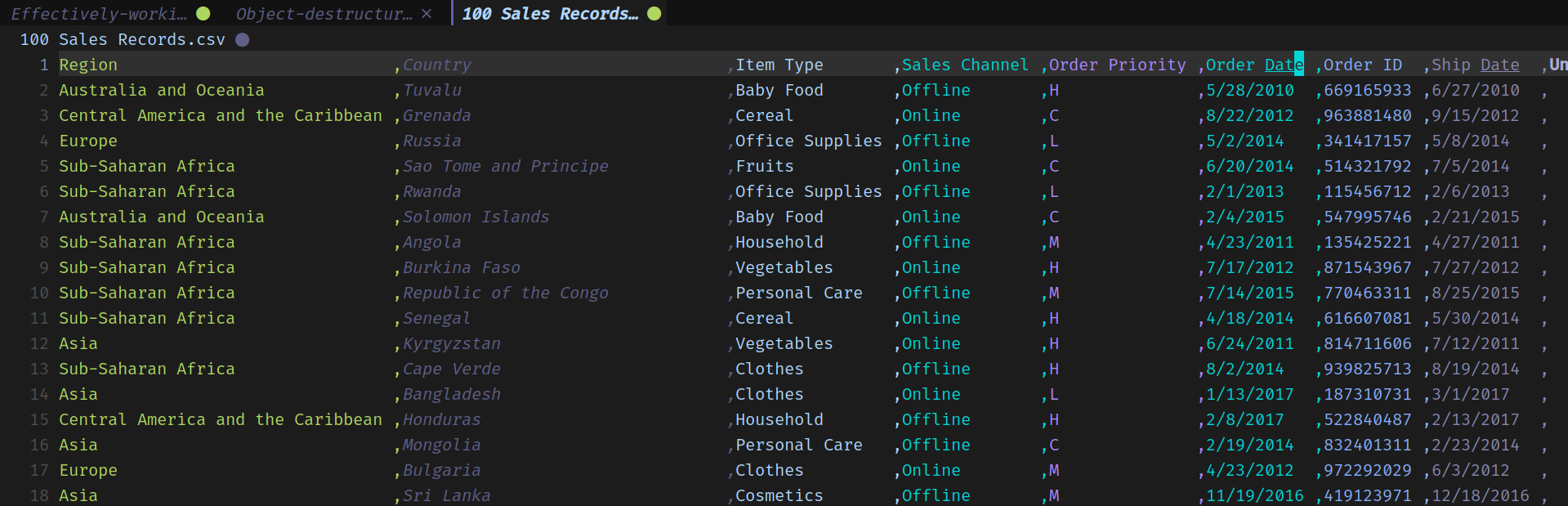
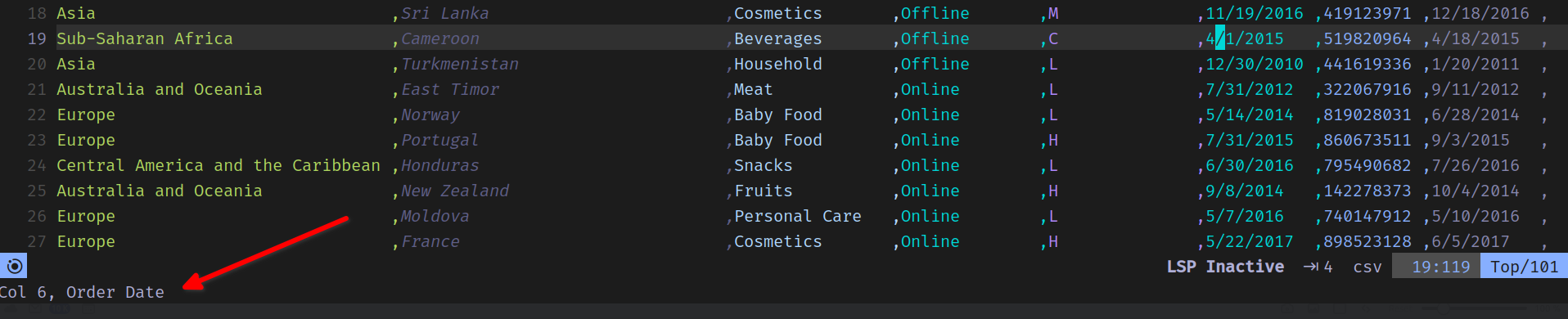
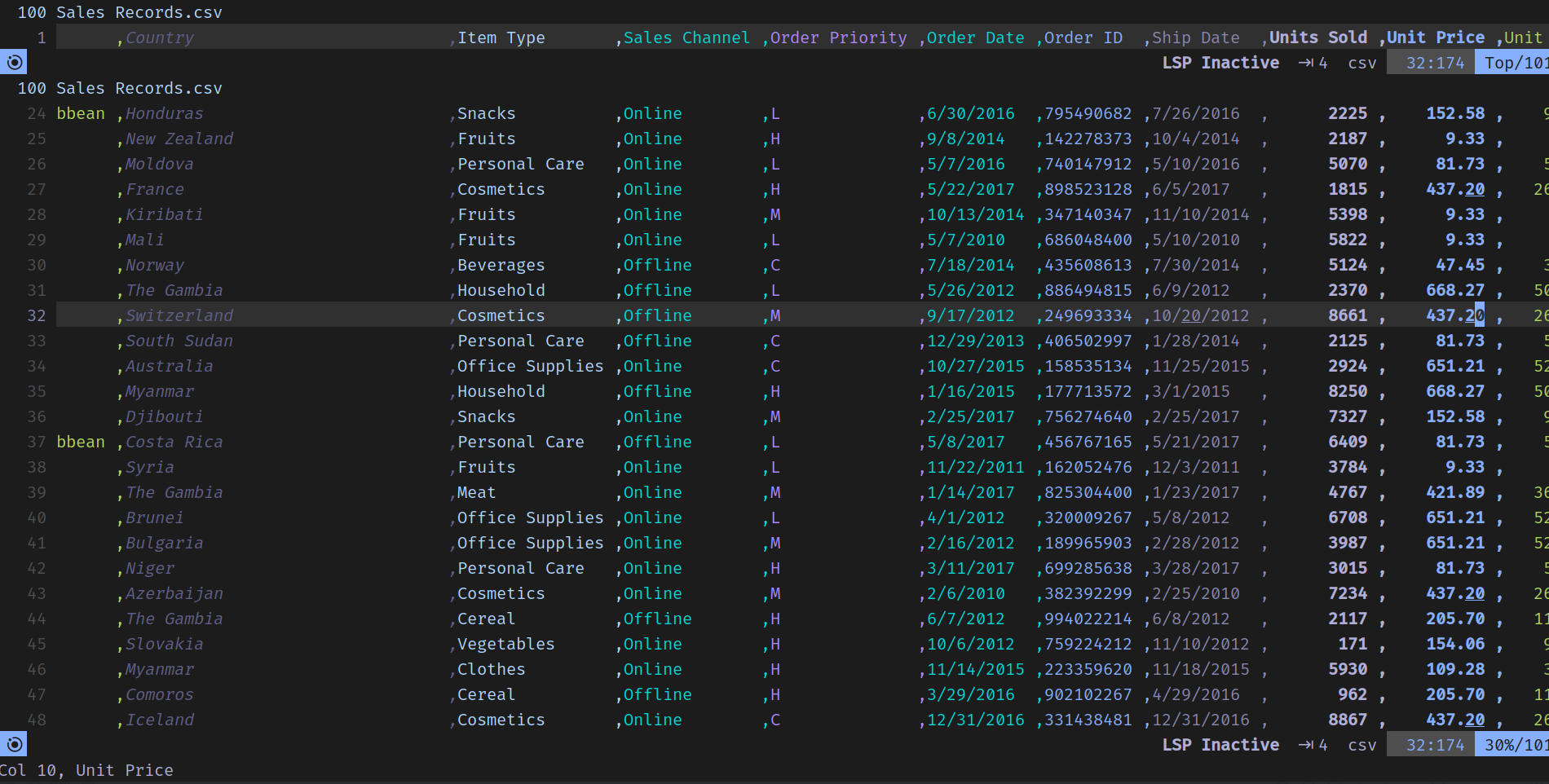
    <content type="html"><![CDATA[<p>I have been looking for ways to effectively make quick edits to CSV files in (neo)vim without needing to fire up another gui.</p><p>This post outlines the quick setup that I have found to be effective. </p><h2 id="Rainbow-CSV-plugin"><a href="#Rainbow-CSV-plugin" class="headerlink" title="Rainbow CSV plugin"></a><a href="https://github.com/cameron-wags/rainbow_csv.nvim" target="_blank" rel="noopener external nofollow noreferrer">Rainbow CSV plugin</a></h2><p>Rainbow CSV is a nice plugin (available for many editors) which colors the csv in a different color for each column. This makes it easy to distinguish between values in different columns.</p><p>Here is what this looks like editing an example file: </p><p><img src="/images/rainbow-csv-1.png" alt="Colored csv files" loading="lazy"></p><p>Another convenient feature is <code>:RainbowAlign</code> which vertically aligns the columns.</p><p><img src="/images/rainbow-csv-2.png" alt="Colored vertically aligned csv files" loading="lazy"></p><p>Be careful that this is actually adding spaces in the file contents, so anything that consumes your csv will likely need to trim the cell contents.</p><p>Its also super convenient that as we move about in the csv, the footer shows the column we are currently at:</p><p><img src="/images/rainbow-csv-5.png" alt="Status footer" loading="lazy"></p><p>The plugin also supports an inbuilt query language but for anything more complex than basic search, I find myself reaching to SQLite which makes it really easy to <a href="https://www.sqlitetutorial.net/sqlite-import-csv/" target="_blank" rel="noopener external nofollow noreferrer">import csv files</a> into a table.</p><h2 id="Frozen-headers"><a href="#Frozen-headers" class="headerlink" title="Frozen headers"></a>Frozen headers</h2><p>If you want a slightly more spreadsheet like feel with the header frozen on top, we can achieve that using core vim features.</p><p>We can use <code>:sp</code> to horizontally split the screen into two windows, and then use <code>Ctrl+w 1 _</code> to resize the top one to show single row.</p><p>After that we can <code>:set scrollopt=hor</code> to configure scroll binding behavior to horizontal sync and after that <code>:set scrollbind</code> in both windows will ensure that as we move about in the primary window the headers stay in sync.</p><p><img src="/images/rainbow-csv-3.png" alt="split screen with headers" loading="lazy"></p>]]></content>


    <summary type="html">&lt;p&gt;I have been looking for ways to effectively make quick edits to CSV files in (neo)vim without needing to fire up another gui.&lt;/p&gt;
&lt;p&gt;This</summary>


    <category term="vim" scheme="https://lorefnon.me/tags/vim/"/>
    
    <category term="csv" scheme="https://lorefnon.me/tags/csv/"/>
    
  </entry>
  
  <entry>
    <title>Object destructuring is useful for arrays too</title>
    <link href="https://lorefnon.me/2023/12/27/object-destructuring-is-useful-for-arrays-too/"/>
    <id>https://lorefnon.me/2023/12/27/object-destructuring-is-useful-for-arrays-too/</id>
    <published>2023-12-26T18:30:00.000Z</published>
    <updated>2024-02-07T18:40:09.464Z</updated>
    
    <content type="html"><![CDATA[<p>Javascript has <a href="https://developer.mozilla.org/en-US/docs/Web/JavaScript/Reference/Operators/Destructuring_assignment#object_destructuring" target="_blank" rel="noopener external nofollow noreferrer">object destructuring</a> for objects, and <a href="https://developer.mozilla.org/en-US/docs/Web/JavaScript/Reference/Operators/Destructuring_assignment#array_destructuring" target="_blank" rel="noopener external nofollow noreferrer">array destructuring</a> for arrays (and other iterables).</p><p>However, we sometimes forget that in javascript arrays are objects too, and thus object destructuring can be used with arrays as well.</p><pre><code class="hljs js"><span class="hljs-keyword">const</span> &#123; <span class="hljs-number">0</span>: a &#125; = [<span class="hljs-number">10</span>]<span class="hljs-variable language_">console</span>.<span class="hljs-title function_">log</span>(a) <span class="hljs-comment">// 10</span></code></pre><p>We need to provide an alternative identifier because <code>0</code> can not be used as one. This works because js arrays quack like objects with string keys. </p><pre><code class="hljs js"><span class="hljs-variable language_">console</span>.<span class="hljs-title function_">log</span>([<span class="hljs-number">10</span>][<span class="hljs-string">&quot;0&quot;</span>]) <span class="hljs-comment">// 10</span></code></pre><p>Above usages are not so useful though, but it can be handy in scenarios where you get a collection from somewhere else and want to extract something useful out of it succinctly.</p><p>So instead of: </p><pre><code class="hljs js">[<span class="hljs-number">1</span>, <span class="hljs-number">2</span>, <span class="hljs-number">3</span>].<span class="hljs-title function_">map</span>(<span class="hljs-function">(<span class="hljs-params">item, index, collection</span>) =&gt;</span> <span class="hljs-string">`<span class="hljs-subst">$&#123;index&#125;</span>/<span class="hljs-subst">$&#123;collection.length&#125;</span>`</span>) <span class="hljs-comment">// [&#x27;0/3&#x27;, &#x27;1/3&#x27;, &#x27;2/3&#x27;]</span></code></pre><p>We could write: </p><pre><code class="hljs js">[<span class="hljs-number">1</span>, <span class="hljs-number">2</span>, <span class="hljs-number">3</span>].<span class="hljs-title function_">map</span>(<span class="hljs-function">(<span class="hljs-params">item, index, &#123; length &#125;</span>) =&gt;</span> <span class="hljs-string">`<span class="hljs-subst">$&#123;index&#125;</span>/<span class="hljs-subst">$&#123;length&#125;</span>`</span>) <span class="hljs-comment">// [&#x27;0/3&#x27;, &#x27;1/3&#x27;, &#x27;2/3&#x27;]</span></code></pre><p>Or, let&#39;s say we need the siblings of each item while iterating: </p><pre><code class="hljs js">[<span class="hljs-number">1</span>, <span class="hljs-number">2</span>, <span class="hljs-number">3</span>].<span class="hljs-title function_">map</span>(<span class="hljs-function">(<span class="hljs-params">item, index, &#123; </span></span><span class="hljs-params"><span class="hljs-function">    [index-<span class="hljs-number">1</span>]: prev,</span></span><span class="hljs-params"><span class="hljs-function">    [index+<span class="hljs-number">1</span>]: next,</span></span><span class="hljs-params"><span class="hljs-function">&#125;</span>) =&gt;</span> (&#123; item, prev, next &#125;))<span class="hljs-comment">// [&#123;&quot;item&quot;:1,&quot;prev&quot;: undefined, &quot;next&quot;:2&#125;,&#123;&quot;item&quot;:2,&quot;prev&quot;:1,&quot;next&quot;:3&#125;,&#123;&quot;item&quot;:3,&quot;prev&quot;:2, &quot;next&quot;: undefined&#125;]</span></code></pre><p>Here we take advantage of the feature that while destructuring, our keys can be computed expressions.</p><p>Also, there is nothing stopping us from making use of destructured items in key expressions within the same destructuring assignment:</p><pre><code class="hljs js">[<span class="hljs-number">1</span>, <span class="hljs-number">2</span>, <span class="hljs-number">3</span>].<span class="hljs-title function_">map</span>(<span class="hljs-function">(<span class="hljs-params">current, index, &#123; </span></span><span class="hljs-params"><span class="hljs-function">    length,</span></span><span class="hljs-params"><span class="hljs-function">    <span class="hljs-number">0</span>: first,</span></span><span class="hljs-params"><span class="hljs-function">    [length-<span class="hljs-number">1</span>]: last</span></span><span class="hljs-params"><span class="hljs-function">&#125;</span>) =&gt;</span> <span class="hljs-string">`<span class="hljs-subst">$&#123;first&#125;</span>...<span class="hljs-subst">$&#123;current&#125;</span>...<span class="hljs-subst">$&#123;last&#125;</span>`</span>)<span class="hljs-comment">// [&#x27;1...1...3&#x27;, &#x27;1...2...3&#x27;, &#x27;1...3...3&#x27;]</span></code></pre><p>JS is fun, yeah ?</p>]]></content>


    <summary type="html">&lt;p&gt;Javascript has &lt;a href=&quot;https://developer.mozilla.org/en-US/docs/Web/JavaScript/Reference/Operators/Destructuring_assignment#object_destr</summary>


    <category term="Javascript" scheme="https://lorefnon.me/tags/Javascript/"/>
    
  </entry>
  
  <entry>
    <title>Integrating hono and graphql yoga</title>
    <link href="https://lorefnon.me/2023/12/17/integrating-hono-and-graphql-yoga/"/>
    <id>https://lorefnon.me/2023/12/17/integrating-hono-and-graphql-yoga/</id>
    <published>2023-12-16T18:30:00.000Z</published>
    <updated>2024-02-07T18:40:09.464Z</updated>
    
    <content type="html"><![CDATA[<p><a href="https://hono.dev/" target="_blank" rel="noopener external nofollow noreferrer">Hono</a> is a lightweight web micro-framework that is compatible with many js runtimes like Cloudflare Workers, Fastly Compute, Deno, Bun, Vercel, Netlify, Lagon, AWS Lambda, Lambda@Edge, and Node.js.</p><p>This quick recipe illustrates how to integrate hono with <a href="https://the-guild.dev/graphql/yoga-server" target="_blank" rel="noopener external nofollow noreferrer">graphql-yoga</a> to serve a GraphQL API. Yoga is quite <a href="https://the-guild.dev/graphql/yoga-server/docs/integrations/z-other-environments" target="_blank" rel="noopener external nofollow noreferrer">flexible</a> about the underlying request handling library.</p><pre><code class="hljs ts"><span class="hljs-keyword">import</span> &#123; serve &#125; <span class="hljs-keyword">from</span> <span class="hljs-string">&quot;@hono/node-server&quot;</span><span class="hljs-keyword">import</span> &#123; createYoga &#125; <span class="hljs-keyword">from</span> <span class="hljs-string">&quot;graphql-yoga&quot;</span><span class="hljs-keyword">import</span> &#123; <span class="hljs-title class_">Hono</span> &#125; <span class="hljs-keyword">from</span> <span class="hljs-string">&quot;hono&quot;</span><span class="hljs-keyword">import</span> &#123; getConfigParam &#125; <span class="hljs-keyword">from</span> <span class="hljs-string">&quot;./config.js&quot;</span><span class="hljs-keyword">import</span> &#123; schema &#125; <span class="hljs-keyword">from</span> <span class="hljs-string">&quot;./schema.js&quot;</span><span class="hljs-keyword">const</span> app = <span class="hljs-keyword">new</span> <span class="hljs-title class_">Hono</span>()<span class="hljs-keyword">const</span> yoga = <span class="hljs-title function_">createYoga</span>(&#123;  schema,  <span class="hljs-attr">logging</span>: <span class="hljs-string">&quot;debug&quot;</span>,  <span class="hljs-attr">plugins</span>: [<span class="hljs-comment">/* Add any plugins here */</span>],&#125;)<span class="hljs-comment">// Configure hono to delegate graphql requests to GraphQL Yoga</span>app.<span class="hljs-title function_">use</span>(<span class="hljs-string">&quot;/graphql&quot;</span>, <span class="hljs-keyword">async</span> (context) =&gt;  yoga.<span class="hljs-title function_">handle</span>(&#123;    <span class="hljs-attr">request</span>: context.<span class="hljs-property">req</span>.<span class="hljs-property">raw</span>,  &#125;, &#123;&#125;))<span class="hljs-title function_">serve</span>(app, <span class="hljs-function">(<span class="hljs-params">info</span>) =&gt;</span> &#123;  <span class="hljs-variable language_">console</span>.<span class="hljs-title function_">log</span>(<span class="hljs-string">`Listening on http://localhost:<span class="hljs-subst">$&#123;info.port&#125;</span>`</span>) <span class="hljs-comment">// Listening on http://localhost:3000</span>&#125;)</code></pre><p><code>schema</code> being imported here is a <a href="https://graphql-js.org/api/class/GraphQLSchema" target="_blank" rel="noopener external nofollow noreferrer">GraphQLSchema</a> instance. You can generate it through any graphql-js compatible library that you are familiar with.</p><p>If you don&#39;t have a preference already, I recommend <a href="https://garph.dev/" target="_blank" rel="noopener external nofollow noreferrer">Garph</a>. It makes it quite convenient to define type safe GraphQL schemas in pure typescript without needing any code generation. And of course, it plays well with graphql-yoga.</p><pre><code class="hljs ts"><span class="hljs-keyword">import</span> &#123; g, <span class="hljs-title class_">InferResolvers</span>, buildSchema &#125; <span class="hljs-keyword">from</span> <span class="hljs-string">&#x27;garph&#x27;</span><span class="hljs-keyword">import</span> &#123; createYoga, <span class="hljs-title class_">YogaInitialContext</span> &#125; <span class="hljs-keyword">from</span> <span class="hljs-string">&#x27;graphql-yoga&#x27;</span><span class="hljs-keyword">import</span> &#123; createServer &#125; <span class="hljs-keyword">from</span> <span class="hljs-string">&#x27;http&#x27;</span><span class="hljs-keyword">const</span> queryType = g.<span class="hljs-title function_">type</span>(<span class="hljs-string">&#x27;Query&#x27;</span>, &#123;  <span class="hljs-attr">greet</span>: g.<span class="hljs-title function_">string</span>()    .<span class="hljs-title function_">args</span>(&#123;      <span class="hljs-attr">name</span>: g.<span class="hljs-title function_">string</span>().<span class="hljs-title function_">optional</span>().<span class="hljs-title function_">default</span>(<span class="hljs-string">&#x27;Max&#x27;</span>)    &#125;)    .<span class="hljs-title function_">description</span>(<span class="hljs-string">&#x27;Greets a person&#x27;</span>)&#125;)<span class="hljs-keyword">const</span> <span class="hljs-attr">resolvers</span>: <span class="hljs-title class_">InferResolvers</span>&lt;&#123; <span class="hljs-title class_">Query</span>: <span class="hljs-keyword">typeof</span> queryType &#125;, &#123; <span class="hljs-attr">context</span>: <span class="hljs-title class_">YogaInitialContext</span> &#125;&gt; = &#123;  <span class="hljs-title class_">Query</span>: &#123;    <span class="hljs-attr">greet</span>: <span class="hljs-function">(<span class="hljs-params">parent, args, context, info</span>) =&gt;</span> <span class="hljs-string">`Hello, <span class="hljs-subst">$&#123;args.name&#125;</span>`</span>  &#125;&#125;<span class="hljs-keyword">const</span> schema = <span class="hljs-title function_">buildSchema</span>(&#123; g, resolvers &#125;)</code></pre>]]></content>


    <summary type="html">&lt;p&gt;&lt;a href=&quot;https://hono.dev/&quot; target=&quot;_blank&quot; rel=&quot;noopener external nofollow noreferrer&quot;&gt;Hono&lt;/a&gt; is a lightweight web micro-framework tha</summary>


    <category term="Node.js" scheme="https://lorefnon.me/tags/Node-js/"/>
    
    <category term="GraphQL" scheme="https://lorefnon.me/tags/GraphQL/"/>
    
    <category term="Hono" scheme="https://lorefnon.me/tags/Hono/"/>
    
  </entry>
  
  <entry>
    <title>Dealing with inferred types exceeding serializable length</title>
    <link href="https://lorefnon.me/2023/11/28/fixing-inferred-types-exceeding-serializable-length/"/>
    <id>https://lorefnon.me/2023/11/28/fixing-inferred-types-exceeding-serializable-length/</id>
    <published>2023-11-27T19:19:18.000Z</published>
    <updated>2024-02-07T18:40:09.464Z</updated>
    
    <content type="html"><![CDATA[<p>When working with validation libraries like zod, it is quite convenient to extract static types from schemas that perform runtime validations.</p><p>However, sometimes when these type compositions get too complex, we can get run into this type error:</p><pre><code class="hljs plaintext">error TS7056: The inferred type of this node exceeds the maximum length the compiler will serialize. An explicit type annotation is needed.</code></pre><p>This problem happens because when we are composing these schema definitions (zod here), for example:</p><pre><code class="hljs typescript"><span class="hljs-keyword">const</span> <span class="hljs-title class_">Department</span> = z.<span class="hljs-title function_">object</span>(&#123;    <span class="hljs-attr">name</span>: z.<span class="hljs-title function_">string</span>()&#125;)<span class="hljs-keyword">export</span> <span class="hljs-keyword">const</span> <span class="hljs-title class_">Company</span> = z.<span class="hljs-title function_">object</span>(&#123;    <span class="hljs-attr">name</span>: z.<span class="hljs-title function_">string</span>(),    <span class="hljs-attr">departments</span>: <span class="hljs-title class_">Department</span>.<span class="hljs-title function_">array</span>(),&#125;);</code></pre><p>While we are using a composition of two schema definitions, when we infer the type we will get a single complex type.</p><pre><code class="hljs typescript"><span class="hljs-keyword">type</span> <span class="hljs-title class_">IDepartment</span> = z.<span class="hljs-property">output</span>&lt;<span class="hljs-keyword">typeof</span> <span class="hljs-title class_">Department</span>&gt;;<span class="hljs-comment">// &#123; name: string &#125;</span><span class="hljs-keyword">type</span> <span class="hljs-title class_">ICompany</span> = z.<span class="hljs-property">output</span>&lt;<span class="hljs-keyword">typeof</span> <span class="hljs-title class_">Company</span>&gt;<span class="hljs-comment">// &#123; name: string, departments: &#123; name: string &#125;[] &#125;</span></code></pre><p>Note that <code>ICompany</code> type does not make use of <code>IDepartment</code> (this would happen even if we defined these types as interfaces instead of aliases). The inferred type of each schema definiton is a separate self contained type.</p><p>So when we are composing many complex types, the composition&#39;s serialized representation includes information about every field of every composed type. This is fine for the simple case here, but it can grow large rapidly for complex types.</p><p>Typescript compiler has an upper limit on the size of this serialized representation. When this is exceeded we get the above error.</p><p>The solution to this is quite simple. We can reduce the size of the composed type by introducing interfaces for the types it uses.</p><pre><code class="hljs typescript"><span class="hljs-keyword">const</span> <span class="hljs-title class_">Department</span> = z.<span class="hljs-title function_">object</span>(&#123;    <span class="hljs-attr">name</span>: z.<span class="hljs-title function_">string</span>()&#125;)<span class="hljs-keyword">type</span> <span class="hljs-title class_">IDepartment</span> = z.<span class="hljs-property">output</span>&lt;<span class="hljs-keyword">typeof</span> <span class="hljs-title class_">Department</span>&gt;;<span class="hljs-keyword">type</span> <span class="hljs-title class_">IDepartmentIn</span> = z.<span class="hljs-property">input</span>&lt;<span class="hljs-keyword">typeof</span> <span class="hljs-title class_">Department</span>&gt;;<span class="hljs-comment">// Explicit type for the runtime schema of Department</span><span class="hljs-keyword">export</span> <span class="hljs-keyword">interface</span> <span class="hljs-title class_">IDepartmentRT</span> <span class="hljs-keyword">extends</span> z.<span class="hljs-title class_">ZodType</span>&lt;<span class="hljs-title class_">IDepartment</span>, z.<span class="hljs-title class_">ZodTypeDef</span>, <span class="hljs-title class_">IDepartmentIn</span>&gt; &#123;&#125;<span class="hljs-keyword">export</span> <span class="hljs-keyword">const</span> <span class="hljs-title class_">Company</span> = z.<span class="hljs-title function_">object</span>(&#123;    <span class="hljs-attr">name</span>: z.<span class="hljs-title function_">string</span>(),    <span class="hljs-attr">departments</span>: (<span class="hljs-title class_">Department</span> <span class="hljs-keyword">as</span> <span class="hljs-title class_">IDepartmentRT</span>).<span class="hljs-title function_">array</span>(),&#125;);<span class="hljs-keyword">type</span> <span class="hljs-title class_">ICompany</span> = z.<span class="hljs-property">output</span>&lt;<span class="hljs-keyword">typeof</span> <span class="hljs-title class_">Company</span>&gt;;<span class="hljs-keyword">type</span> <span class="hljs-title class_">ICompanyIn</span> = z.<span class="hljs-property">input</span>&lt;<span class="hljs-keyword">typeof</span> <span class="hljs-title class_">Company</span>&gt;;</code></pre><p>Now the serialized representation of <code>ICompany</code> will refer to <code>IDepartmentRT</code> and so the fields of Department type are not included in the serialized representation, reducing its size. And we also don&#39;t have to redefine the zod schema separately as an interface. </p>]]></content>


    <summary type="html">&lt;p&gt;When working with validation libraries like zod, it is quite convenient to extract static types from schemas that perform runtime validat</summary>


    <category term="typescript, zod" scheme="https://lorefnon.me/tags/typescript-zod/"/>
    
  </entry>
  
  <entry>
    <title>Conditional Queries in Postgres with help from JSON Operators</title>
    <link href="https://lorefnon.me/2023/08/27/conditional-queries-in-postgres-with-help-from-json-operators/"/>
    <id>https://lorefnon.me/2023/08/27/conditional-queries-in-postgres-with-help-from-json-operators/</id>
    <published>2023-08-26T18:30:00.000Z</published>
    <updated>2024-02-07T18:40:09.464Z</updated>
    
    <content type="html"><![CDATA[<p>For many mainstream languages we have query builder libraries that enable us to easily create <code>select</code> queries with complex <code>where</code> conditions that conditionally filter by multiple columns based on incoming input. These are often useful for things like a filter panel in product catalogue where user may specify one or more of several possible criteria.</p><p>This post outlines an alternative solution. If we structure our input parameter as json (or any other compound data type for that matter), we can handle the conditional clauses within SQL with some creativity.</p><p>For example, to find users by id or email, we can do something like this: </p><pre><code class="hljs sql"><span class="hljs-keyword">select</span> <span class="hljs-operator">*</span> <span class="hljs-keyword">from</span> &quot;user&quot; u <span class="hljs-keyword">left</span> <span class="hljs-keyword">join</span> user_email ue     <span class="hljs-keyword">on</span> ue.user_id <span class="hljs-operator">=</span> u.id<span class="hljs-keyword">where</span>     (        <span class="hljs-comment">-- Filter conditions</span>        ($<span class="hljs-number">1</span>::jsonb #<span class="hljs-operator">&gt;&gt;</span> <span class="hljs-string">&#x27;&#123;id,eq&#125;&#x27;</span> <span class="hljs-keyword">is</span> <span class="hljs-keyword">null</span> <span class="hljs-keyword">or</span> u.id <span class="hljs-operator">=</span> ($<span class="hljs-number">1</span>::jsonb #<span class="hljs-operator">&gt;&gt;</span> <span class="hljs-string">&#x27;&#123;id,eq&#125;&#x27;</span>)::<span class="hljs-type">bigint</span> ) <span class="hljs-keyword">or</span>        ($<span class="hljs-number">1</span>::jsonb #<span class="hljs-operator">&gt;&gt;</span> <span class="hljs-string">&#x27;&#123;email,eq&#125;&#x27;</span> <span class="hljs-keyword">is</span> <span class="hljs-keyword">null</span> <span class="hljs-keyword">or</span> ue.email <span class="hljs-operator">=</span> ($<span class="hljs-number">1</span>::jsonb #<span class="hljs-operator">&gt;&gt;</span> <span class="hljs-string">&#x27;&#123;email,eq&#125;&#x27;</span>))    ) <span class="hljs-keyword">and</span>    <span class="hljs-comment">-- Fallback to ensure that nothing is selected if no filters are passed</span>    ($<span class="hljs-number">1</span>::jsonb #<span class="hljs-operator">&gt;&gt;</span> <span class="hljs-string">&#x27;&#123;id,eq&#125;&#x27;</span> <span class="hljs-keyword">is</span> <span class="hljs-keyword">not</span> <span class="hljs-keyword">null</span> <span class="hljs-keyword">or</span> $<span class="hljs-number">1</span>::jsonb #<span class="hljs-operator">&gt;&gt;</span> <span class="hljs-string">&#x27;&#123;email,eq&#125;&#x27;</span> <span class="hljs-keyword">is</span> <span class="hljs-keyword">not</span> <span class="hljs-keyword">null</span>)</code></pre><p>We can pass input parameters like: <code>&#123; &quot;id&quot;: &#123; &quot;eq&quot;: 1 &#125; &#125;</code> or <code>&#123; &quot;email&quot;: &#123; &quot;eq&quot;: &quot;lorefnon@tutanota.com&quot; &#125; &#125;</code> and it will filter appropriately.</p><p>We can skip the jsonb cast if our client library allows us to cast parameters while passing to database</p><pre><code class="hljs sql"><span class="hljs-keyword">select</span> <span class="hljs-operator">*</span> <span class="hljs-keyword">from</span> &quot;user&quot; u <span class="hljs-keyword">left</span> <span class="hljs-keyword">join</span> user_email ue     <span class="hljs-keyword">on</span> ue.user_id <span class="hljs-operator">=</span> u.id<span class="hljs-keyword">where</span>     (        <span class="hljs-comment">-- Filter conditions</span>        (($<span class="hljs-number">1</span> #<span class="hljs-operator">&gt;&gt;</span> <span class="hljs-string">&#x27;&#123;id,eq&#125;&#x27;</span>) <span class="hljs-keyword">is</span> <span class="hljs-keyword">null</span> <span class="hljs-keyword">or</span> u.id <span class="hljs-operator">=</span> ($<span class="hljs-number">1</span> #<span class="hljs-operator">&gt;&gt;</span> <span class="hljs-string">&#x27;&#123;id,eq&#125;&#x27;</span>)::<span class="hljs-type">bigint</span> ) <span class="hljs-keyword">or</span>        (($<span class="hljs-number">1</span> #<span class="hljs-operator">&gt;&gt;</span> <span class="hljs-string">&#x27;&#123;email,eq&#125;&#x27;</span>) <span class="hljs-keyword">is</span> <span class="hljs-keyword">null</span> <span class="hljs-keyword">or</span> ue.email <span class="hljs-operator">=</span> ($<span class="hljs-number">1</span> #<span class="hljs-operator">&gt;&gt;</span> <span class="hljs-string">&#x27;&#123;email,eq&#125;&#x27;</span>))    ) <span class="hljs-keyword">and</span>    <span class="hljs-comment">-- Fallback to ensure that nothing is selected if no filters are passed</span>    ($<span class="hljs-number">1</span> #<span class="hljs-operator">&gt;&gt;</span> <span class="hljs-string">&#x27;&#123;id,eq&#125;&#x27;</span> <span class="hljs-keyword">is</span> <span class="hljs-keyword">not</span> <span class="hljs-keyword">null</span> <span class="hljs-keyword">or</span> $<span class="hljs-number">1</span> #<span class="hljs-operator">&gt;&gt;</span> <span class="hljs-string">&#x27;&#123;email,eq&#125;&#x27;</span> <span class="hljs-keyword">is</span> <span class="hljs-keyword">not</span> <span class="hljs-keyword">null</span>)</code></pre><p>While this is arguably more verbose and less readable (due to the use of non-intuitive json operators), there are a few benefits to this approach.</p><p>One is that we don&#39;t need a complex query builder library, which may be a plus if we are working with a niche language and&#x2F;or a restricted runtime like openresty. </p><p>Other is that this approach pairs well with prepared statements and the query can be parsed and analyzed just once - if we use a query builder to create slightly differing SELECT statements for various use cases, they would need to be parsed separately each time. Of course, we are trading off per-execution query parsing with per-execution json parsing, but if our json is not very complex, the parsing overhead is lower.</p><p>One apparent limitation is that we can not perform conditional joins. However, that can often be alleviated with usage of unions:</p><pre><code class="hljs sql"><span class="hljs-keyword">select</span> <span class="hljs-operator">*</span> <span class="hljs-keyword">from</span> &quot;user&quot; u<span class="hljs-keyword">where</span>     ($<span class="hljs-number">1</span> #<span class="hljs-operator">&gt;&gt;</span> <span class="hljs-string">&#x27;&#123;id,eq&#125;&#x27;</span>) <span class="hljs-keyword">is</span> <span class="hljs-keyword">not</span> <span class="hljs-keyword">null</span> <span class="hljs-keyword">and</span> u.id <span class="hljs-operator">=</span> ($<span class="hljs-number">1</span> #<span class="hljs-operator">&gt;&gt;</span> <span class="hljs-string">&#x27;&#123;id,eq&#125;&#x27;</span>)::<span class="hljs-type">bigint</span><span class="hljs-keyword">union</span> <span class="hljs-keyword">all</span> <span class="hljs-keyword">select</span> u.<span class="hljs-operator">*</span> <span class="hljs-keyword">from</span> &quot;user&quot; u<span class="hljs-keyword">join</span> user_email ue    <span class="hljs-keyword">on</span> ue.user_id <span class="hljs-operator">=</span> u.id<span class="hljs-keyword">where</span>    ($<span class="hljs-number">1</span> #<span class="hljs-operator">&gt;&gt;</span> <span class="hljs-string">&#x27;&#123;email,eq&#125;&#x27;</span>) <span class="hljs-keyword">is</span> <span class="hljs-keyword">not</span> <span class="hljs-keyword">null</span> <span class="hljs-keyword">and</span> ue.email <span class="hljs-operator">=</span> ($<span class="hljs-number">1</span> #<span class="hljs-operator">&gt;&gt;</span> <span class="hljs-string">&#x27;&#123;email, eq&#125;&#x27;</span>)</code></pre><p>or, by building up subselections for individual filters in CTE steps and then combining them in the final select:</p><pre><code class="hljs sql"><span class="hljs-comment">-- CTE Steps for each possible criteria</span><span class="hljs-keyword">with</span> user_fby_email <span class="hljs-keyword">as</span> (    <span class="hljs-keyword">select</span> ue.user_id     <span class="hljs-keyword">from</span> user_email ue    <span class="hljs-keyword">where</span> ($<span class="hljs-number">1</span>::json #<span class="hljs-operator">&gt;&gt;</span> <span class="hljs-string">&#x27;&#123;email,eq&#125;&#x27;</span>) <span class="hljs-keyword">is</span> <span class="hljs-keyword">not</span> <span class="hljs-keyword">null</span> <span class="hljs-keyword">and</span> ue.email <span class="hljs-operator">=</span> ($<span class="hljs-number">1</span>::json #<span class="hljs-operator">&gt;&gt;</span> <span class="hljs-string">&#x27;&#123;email,eq&#125;&#x27;</span>))<span class="hljs-comment">-- Directly handle the criteria for user table (for which an additional subquery is unnecessary)</span><span class="hljs-keyword">select</span> u.<span class="hljs-operator">*</span><span class="hljs-keyword">from</span> &quot;user&quot; u<span class="hljs-keyword">where</span> (($<span class="hljs-number">1</span> #<span class="hljs-operator">&gt;&gt;</span> <span class="hljs-string">&#x27;&#123;id,eq&#125;&#x27;</span> <span class="hljs-keyword">is</span> <span class="hljs-keyword">not</span> <span class="hljs-keyword">null</span> <span class="hljs-keyword">and</span> u.id <span class="hljs-operator">=</span> ($<span class="hljs-number">1</span>::jsonb #<span class="hljs-operator">&gt;&gt;</span> <span class="hljs-string">&#x27;&#123;id,eq&#125;&#x27;</span>)::<span class="hljs-type">bigint</span> ))<span class="hljs-keyword">union</span> <span class="hljs-keyword">all</span><span class="hljs-comment">-- Merge users for each criteria</span><span class="hljs-keyword">select</span> u.<span class="hljs-operator">*</span><span class="hljs-keyword">from</span> &quot;user&quot; u<span class="hljs-keyword">where</span> u.id <span class="hljs-keyword">in</span> (<span class="hljs-keyword">select</span> user_id <span class="hljs-keyword">from</span> user_fby_email)</code></pre><p>The latter tends to be more readable when there are many possible filter criteria.</p><p>When using multiple tables, these approaches are likely to enable better index utilization.</p><p>We do need to analyze EXPLAIN queries with all possible combinations of inputs to ensure that indexes are properly utilized - but that is something we would have needed when using query builders or ORMs too.</p>]]></content>


    <summary type="html">&lt;p&gt;For many mainstream languages we have query builder libraries that enable us to easily create &lt;code&gt;select&lt;/code&gt; queries with complex &lt;c</summary>


    <category term="Postgres" scheme="https://lorefnon.me/tags/Postgres/"/>
    
    <category term="JSON" scheme="https://lorefnon.me/tags/JSON/"/>
    
  </entry>
  
  <entry>
    <title>Using Vector to funnel Docker Compose logs to S3</title>
    <link href="https://lorefnon.me/2023/08/20/using-vector-to-funnel-docker-compose-logs-to-s3/"/>
    <id>https://lorefnon.me/2023/08/20/using-vector-to-funnel-docker-compose-logs-to-s3/</id>
    <published>2023-08-19T18:30:00.000Z</published>
    <updated>2024-02-07T18:40:09.464Z</updated>
    
    <content type="html"><![CDATA[<p><a href="https://docs.docker.com/compose/" target="_blank" rel="noopener external nofollow noreferrer">Docker compose</a> is an easy-to-use utility for running multi-container applications. It is particularly suited for development and local testing, but is also useful for production development of low-traffic&#x2F;personal-use application which neither need a full fledged cluster nor features like auto-scaling&#x2F;failover-handling which come with more advanced container orchestration solutions.</p><p>This post is a quick recipe to funnel docker compose logs to AWS S3 for long term archival.</p><p>The utility we use for shipping the logs is <a href="https://vector.dev/guides/" target="_blank" rel="noopener external nofollow noreferrer">Vector</a>. Vector is a full featured observability pipeline solution which supports not just shipping but also aggregating and transforming logs. However, in this post we just use it to ship logs to a bucket so that we can analyse them later if needed. Being a rust-based native utility, it has a very low footprint and is well suited to single server or homelab deployments.</p><p>In <code>docker-compose.yaml</code>:</p><pre><code class="hljs yaml"><span class="hljs-attr">version:</span> <span class="hljs-string">&quot;3.9&quot;</span><span class="hljs-attr">services:</span>  <span class="hljs-attr">vector:</span>    <span class="hljs-attr">image:</span> <span class="hljs-string">timberio/vector:0.31.0-debian</span>    <span class="hljs-attr">restart:</span> <span class="hljs-string">always</span>    <span class="hljs-attr">container_name:</span> <span class="hljs-string">vector</span>    <span class="hljs-attr">hostname:</span> <span class="hljs-string">vector</span>    <span class="hljs-attr">environment:</span>       <span class="hljs-bullet">-</span> <span class="hljs-string">DOCKER_HOST=&quot;unix:///var/run/docker.sock&quot;</span>      <span class="hljs-bullet">-</span> <span class="hljs-string">AWS_ACCESS_KEY_ID</span>      <span class="hljs-bullet">-</span> <span class="hljs-string">AWS_SECRET_ACCESS_KEY</span>      <span class="hljs-bullet">-</span> <span class="hljs-string">AWS_REGION</span>    <span class="hljs-attr">ports:</span>      <span class="hljs-bullet">-</span> <span class="hljs-string">&#x27;8383:8383&#x27;</span>    <span class="hljs-attr">volumes:</span>      <span class="hljs-bullet">-</span> <span class="hljs-string">./vector-setup/vector.yaml:/etc/vector/vector.yaml:ro</span>      <span class="hljs-bullet">-</span> <span class="hljs-string">/var/run/docker.sock:/var/run/docker.sock:ro</span>    <span class="hljs-attr">command:</span> <span class="hljs-string">--config</span> <span class="hljs-string">/etc/vector/vector.yaml</span>  <span class="hljs-comment"># Add any other services:</span>  <span class="hljs-attr">caddy:</span>    <span class="hljs-attr">image:</span> <span class="hljs-string">caddy:latest</span>    <span class="hljs-attr">volumes:</span>      <span class="hljs-bullet">-</span> <span class="hljs-string">./modules/caddy-setup/tmp/config:/config</span>      <span class="hljs-bullet">-</span> <span class="hljs-string">./modules/caddy-setup/tmp/data:/data</span>      <span class="hljs-bullet">-</span> <span class="hljs-string">./modules/caddy-setup/Caddyfile:/etc/caddy/Caddyfile</span>    <span class="hljs-attr">ports:</span>      <span class="hljs-bullet">-</span> <span class="hljs-string">&quot;80:80&quot;</span>      <span class="hljs-bullet">-</span> <span class="hljs-string">&quot;443:443&quot;</span></code></pre><p>Since vector needs to communicate with the docker daemon we need to mount the docker socket and make it available to the vector container.</p><p>In the vector.yaml config, we can specify which bucket we want to funnel our logs to and which services we want to track:</p><pre><code class="hljs yaml"><span class="hljs-attr">data_dir:</span> <span class="hljs-string">/var/lib/vector</span><span class="hljs-attr">sources:</span>  <span class="hljs-attr">docker_logs_source:</span>    <span class="hljs-attr">type:</span> <span class="hljs-string">docker_logs</span>    <span class="hljs-attr">docker_host:</span> <span class="hljs-string">&quot;unix:///var/run/docker.sock&quot;</span><span class="hljs-attr">sinks:</span>  <span class="hljs-attr">s3_sink:</span>    <span class="hljs-attr">type:</span> <span class="hljs-string">aws_s3</span>    <span class="hljs-attr">inputs:</span> [<span class="hljs-string">docker_logs_source</span>]    <span class="hljs-attr">region:</span> <span class="hljs-string">ap-south-1</span>    <span class="hljs-attr">bucket:</span> <span class="hljs-string">my-service-logs</span>    <span class="hljs-attr">key_prefix:</span> <span class="hljs-string">&quot;container-logs/date=%Y-%m-%d&quot;</span>    <span class="hljs-attr">compression:</span> <span class="hljs-string">gzip</span>    <span class="hljs-attr">encoding:</span>      <span class="hljs-attr">codec:</span> <span class="hljs-string">json</span></code></pre><p>And that is all we need. Once we run <code>docker compose up</code>, after a while we should see our logs getting dumped into the S3 bucket.</p>]]></content>


    <summary type="html">&lt;p&gt;&lt;a href=&quot;https://docs.docker.com/compose/&quot; target=&quot;_blank&quot; rel=&quot;noopener external nofollow noreferrer&quot;&gt;Docker compose&lt;/a&gt; is an easy-to-u</summary>


    <category term="AWS" scheme="https://lorefnon.me/tags/AWS/"/>
    
    <category term="Docker" scheme="https://lorefnon.me/tags/Docker/"/>
    
    <category term="Docker-Compose" scheme="https://lorefnon.me/tags/Docker-Compose/"/>
    
    <category term="Vector" scheme="https://lorefnon.me/tags/Vector/"/>
    
    <category term="S3" scheme="https://lorefnon.me/tags/S3/"/>
    
  </entry>
  
  <entry>
    <title>integrating CtrlP with Nvimtree in lunarvim</title>
    <link href="https://lorefnon.me/2023/08/20/integating-ctrlp-with-nvimtree-in-lunarvim/"/>
    <id>https://lorefnon.me/2023/08/20/integating-ctrlp-with-nvimtree-in-lunarvim/</id>
    <published>2023-08-19T18:30:00.000Z</published>
    <updated>2024-02-07T18:40:09.464Z</updated>
    
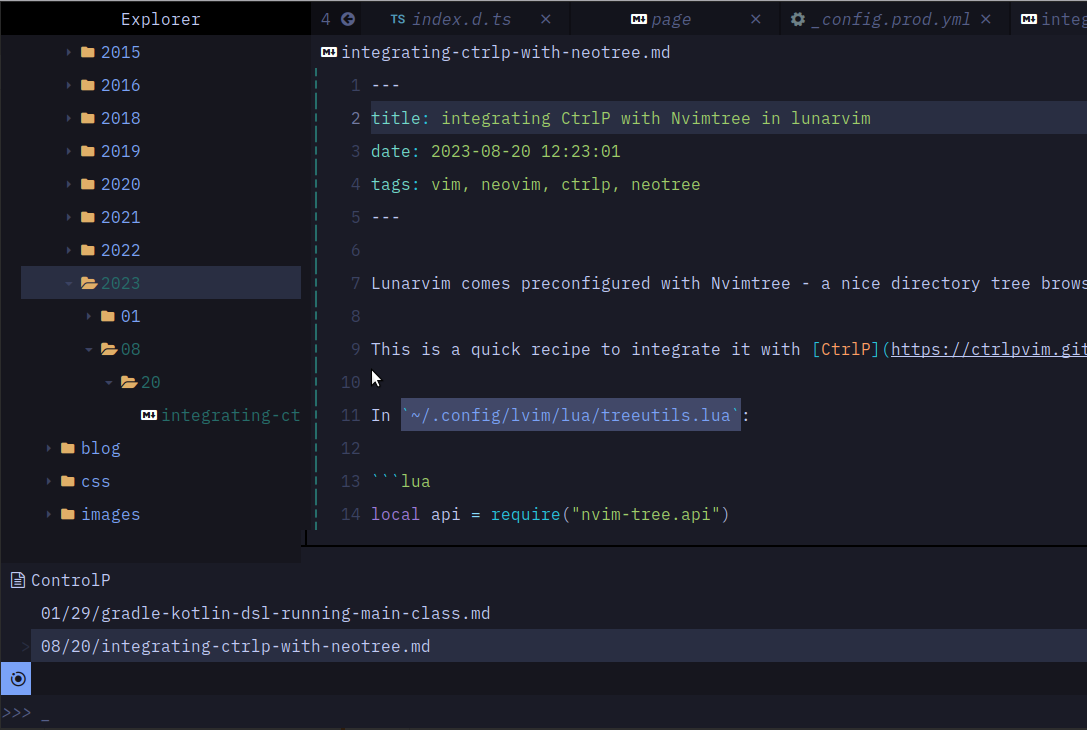
    <content type="html"><![CDATA[<p><a href="https://www.lunarvim.org/" target="_blank" rel="noopener external nofollow noreferrer">Lunarvim</a> comes preconfigured with <a href="https://github.com/nvim-tree/nvim-tree.lua" target="_blank" rel="noopener external nofollow noreferrer">Nvimtree</a> - a nice directory tree browser which is also extensible through lua.</p><p>This is a quick recipe to integrate it with <a href="https://ctrlpvim.github.io/ctrlp.vim/" target="_blank" rel="noopener external nofollow noreferrer">CtrlP</a> - my preferred file finder for vim.</p><p>In <code>~/.config/lvim/lua/treeutils.lua</code>:</p><pre><code class="hljs lua"><span class="hljs-keyword">local</span> api = <span class="hljs-built_in">require</span>(<span class="hljs-string">&quot;nvim-tree.api&quot;</span>)<span class="hljs-keyword">local</span> M = &#123;&#125;<span class="hljs-comment">-- Launch CtrlP from selected tree node</span><span class="hljs-function"><span class="hljs-keyword">function</span> <span class="hljs-title">M.launch_ctrlp</span><span class="hljs-params">()</span></span>    <span class="hljs-keyword">local</span> node = api.tree.get_node_under_cursor()    <span class="hljs-keyword">local</span> is_folder = node.fs_stat <span class="hljs-keyword">and</span> node.fs_stat.<span class="hljs-built_in">type</span> == <span class="hljs-string">&#x27;directory&#x27;</span> <span class="hljs-keyword">or</span> <span class="hljs-literal">false</span>    <span class="hljs-keyword">local</span> basedir = is_folder <span class="hljs-keyword">and</span> node.absolute_path <span class="hljs-keyword">or</span> vim.fn.fnamemodify(node.absolute_path, <span class="hljs-string">&quot;:h&quot;</span>)    vim.cmd(<span class="hljs-string">&quot;CtrlP &quot;</span> .. basedir)<span class="hljs-keyword">end</span><span class="hljs-keyword">return</span> M</code></pre><p>In <code>~/.config/lvim/config.lua</code>:</p><pre><code class="hljs lua">lvim.builtin.nvimtree.setup.on_attach = <span class="hljs-function"><span class="hljs-keyword">function</span><span class="hljs-params">(bufnr)</span></span>    <span class="hljs-keyword">local</span> api       = <span class="hljs-built_in">require</span> <span class="hljs-string">&quot;nvim-tree.api&quot;</span>    <span class="hljs-keyword">local</span> treeutils = <span class="hljs-built_in">require</span> <span class="hljs-string">&quot;treeutils&quot;</span>    <span class="hljs-keyword">local</span> <span class="hljs-function"><span class="hljs-keyword">function</span> <span class="hljs-title">opts</span><span class="hljs-params">(desc)</span></span>        <span class="hljs-keyword">return</span> &#123; desc = <span class="hljs-string">&quot;nvim-tree: &quot;</span> .. desc, buffer = bufnr, noremap = <span class="hljs-literal">true</span>, silent = <span class="hljs-literal">true</span>, nowait = <span class="hljs-literal">true</span> &#125;    <span class="hljs-keyword">end</span>    api.<span class="hljs-built_in">config</span>.mappings.default_on_attach(bufnr)    <span class="hljs-keyword">local</span> useful_keys = &#123;        [<span class="hljs-string">&quot;&lt;C-p&gt;&quot;</span>] = &#123; treeutils.launch_ctrlp, opts <span class="hljs-string">&quot;Launch CtrlP&quot;</span> &#125;,        <span class="hljs-comment">-- Other useful keybindings - cherry pick</span>        [<span class="hljs-string">&quot;l&quot;</span>] = &#123; api.node.<span class="hljs-built_in">open</span>.edit, opts <span class="hljs-string">&quot;Open&quot;</span> &#125;,        [<span class="hljs-string">&quot;o&quot;</span>] = &#123; api.node.<span class="hljs-built_in">open</span>.edit, opts <span class="hljs-string">&quot;Open&quot;</span> &#125;,        [<span class="hljs-string">&quot;&lt;CR&gt;&quot;</span>] = &#123; api.node.<span class="hljs-built_in">open</span>.edit, opts <span class="hljs-string">&quot;Open&quot;</span> &#125;,        [<span class="hljs-string">&quot;v&quot;</span>] = &#123; api.node.<span class="hljs-built_in">open</span>.vertical, opts <span class="hljs-string">&quot;Open: Vertical Split&quot;</span> &#125;,        [<span class="hljs-string">&quot;h&quot;</span>] = &#123; api.node.navigate.parent_close, opts <span class="hljs-string">&quot;Close Directory&quot;</span> &#125;,        [<span class="hljs-string">&quot;C&quot;</span>] = &#123; api.tree.change_root_to_node, opts <span class="hljs-string">&quot;CD&quot;</span> &#125;,    &#125;    <span class="hljs-built_in">require</span>(<span class="hljs-string">&quot;lvim.keymappings&quot;</span>).load_mode(<span class="hljs-string">&quot;n&quot;</span>, useful_keys)<span class="hljs-keyword">end</span></code></pre><p>Now, whenever we do a <code>ctrl+p</code> with our cursor on a directory node, we&#39;ll get a file selector scoped to that directory.</p><p><img src="/images/2023-08-20-nvim-ctrlp-screenshot.png" loading="lazy"></p>]]></content>


    <summary type="html">&lt;p&gt;&lt;a href=&quot;https://www.lunarvim.org/&quot; target=&quot;_blank&quot; rel=&quot;noopener external nofollow noreferrer&quot;&gt;Lunarvim&lt;/a&gt; comes preconfigured with &lt;a </summary>


    <category term="Vim" scheme="https://lorefnon.me/tags/Vim/"/>
    
    <category term="Neovim" scheme="https://lorefnon.me/tags/Neovim/"/>
    
    <category term="CtrlP" scheme="https://lorefnon.me/tags/CtrlP/"/>
    
    <category term="Neotree" scheme="https://lorefnon.me/tags/Neotree/"/>
    
  </entry>
  
</feed>